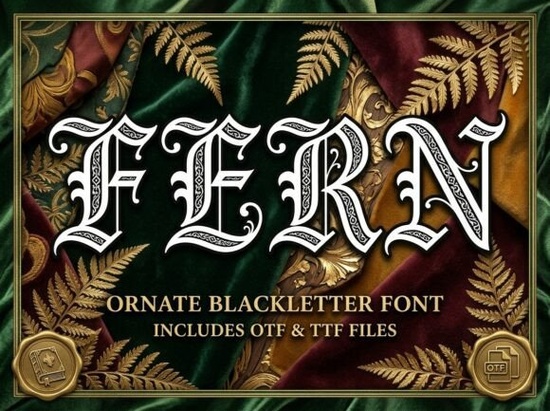
Looking for a blackletter font that feels both medieval and luxurious? Fern Font is a decorative blackletter typeface built for designers who want gothic drama without sacrificing personality. With its sharp Textura-style letterforms, calligraphic flourishes, and ornamental filigree, it sits right at the intersection of historical manuscript art and modern dark-fantasy branding.
What makes Fern different from other blackletter fonts?
Most blackletter fonts lean heavily on tradition and stop there. Fern takes the classic Textura structure and adds sweeping spiked terminals and fine internal detailing that you'd usually only see in hand-drawn cathedral manuscripts. The result is a typeface that looks regal and commanding without feeling outdated.
The heavy structural weight gives it real presence at large sizes, which is exactly what you need for:
- Custom tavern and craft brewery signage
- Luxury book spines and cover designs
- Dark-fantasy and medieval social media headers
- Gaming and entertainment merchandise
- Gothic wedding invitations and event materials
If you've been exploring blackletter fonts with decorative detail, Fern stands out for this specific blend of ornament and weight.
Who is Fern Font best suited for?
This font works especially well for certain creative professionals and projects:
Independent craft breweries and distilleries. If you're designing bottle labels or tap handles, Fern brings that old-world alehouse character. The spiked terminals and filigree details look fantastic on textured paper or matte label stock.
Print-on-demand sellers. Dark-fantasy and medieval-themed designs continue to sell well on platforms like Redbubble, Merch by Amazon, and Etsy. Fern gives your typography a distinctive look that stands out in crowded marketplaces especially for gaming culture, metal music, and fantasy genre designs.
Book designers and self-publishers. A strong gothic typeface on a book spine or chapter heading immediately signals genre. Fantasy, horror, historical fiction Fern fits right in.
Small business owners with themed branding. Escape rooms, medieval-themed restaurants, gaming cafes, and similar businesses need fonts that communicate their identity at a glance. Fern does that job clearly.
How does Fern handle at smaller sizes?
Let's be honest ornate blackletter fonts don't always work well at small sizes. The fine filigree and internal details in Fern are best appreciated at larger display sizes. For body text or small print runs, you'll want to pair it with a clean serif or sans-serif font.
Think of Fern as your headline and display font, not your paragraph text. A good pairing approach: use Fern for titles, headers, and logos, then choose a simpler complementary typeface for supporting text. This keeps your designs readable while letting the gothic personality of this typeface do the heavy lifting where it matters most.
What should I pair with Fern Font?
Pairing a decorative blackletter with the right companion font makes all the difference. Here are a few approaches that work well:
- Modern sans-serif for contrast: A clean geometric sans-serif next to Fern creates a strong visual tension that feels intentional and polished.
- Classic serif for cohesion: If you're going for an all-classical look, pair Fern with a traditional serif like Garamond or Caslon.
- Handwritten script for warmth: A casual script font can soften Fern's intensity and work well for event invitations or branding with a personal touch.
The key is to keep the supporting typeface simple. Fern is already doing a lot of visual work, so its partner should complement, not compete.
What file formats and licensing should I know about?
When you download Fern from Creative Fabrica, you get standard font files compatible with most design software including Adobe Illustrator, Photoshop, Canva, and Cricut Design Space. Creative Fabrica's licensing typically covers both personal and commercial projects, but always double-check the specific license terms on the product page before using fonts in client work or products for sale.
Practical tips for working with Fern
- Set it large. Fern's details shine at display sizes. Don't cramp it into small text blocks.
- Give it breathing room. Increase letter spacing slightly to let the flourishes and terminals read clearly.
- Use high-contrast backgrounds. Gold on black, white on dark wood textures, or silver on deep burgundy all work beautifully with this style.
- Test before you print. Always run a test print or mockup to check how the fine details reproduce on your chosen material especially on textured label stock or fabric.
- Check your license. Make sure your intended use commercial products, client work, print-on-demand is covered under the license you have.
Next step
Preview the full character set on the Fern Font product page, type out your project name, and see how it looks in context before committing. A quick mockup in your design tool will tell you right away if Fern is the right fit for what you're working on.
Download Now Creative Special Fonts to Elevate Your Design Projects
 Sunny Font: Bright and Cheerful Typography for Creative Designs
 Skyline Font: Modern Urban Typography for Bold Designs
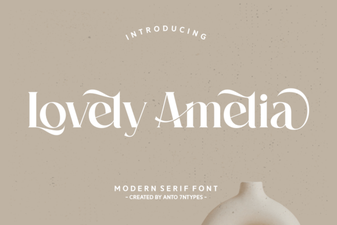 Lovely Amelia Font: Elegant Script for Creative Projects
 Discover Adorable Kawaii Fonts for Creative Design Projects
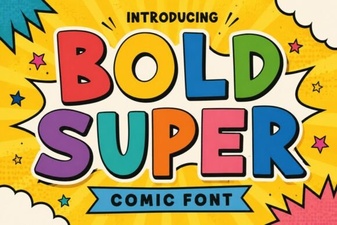 Bold Super Font: Eye-Catching Typography for Modern Designs